Online training platform

Your own online training academy. Build it, brand it, sell it.

Create interactive courses, sell them to individuals or whole organisations, and issue certificates, all from your own branded workspace at yourname.on.training.

30-day free trial. Every application is reviewed by our team.
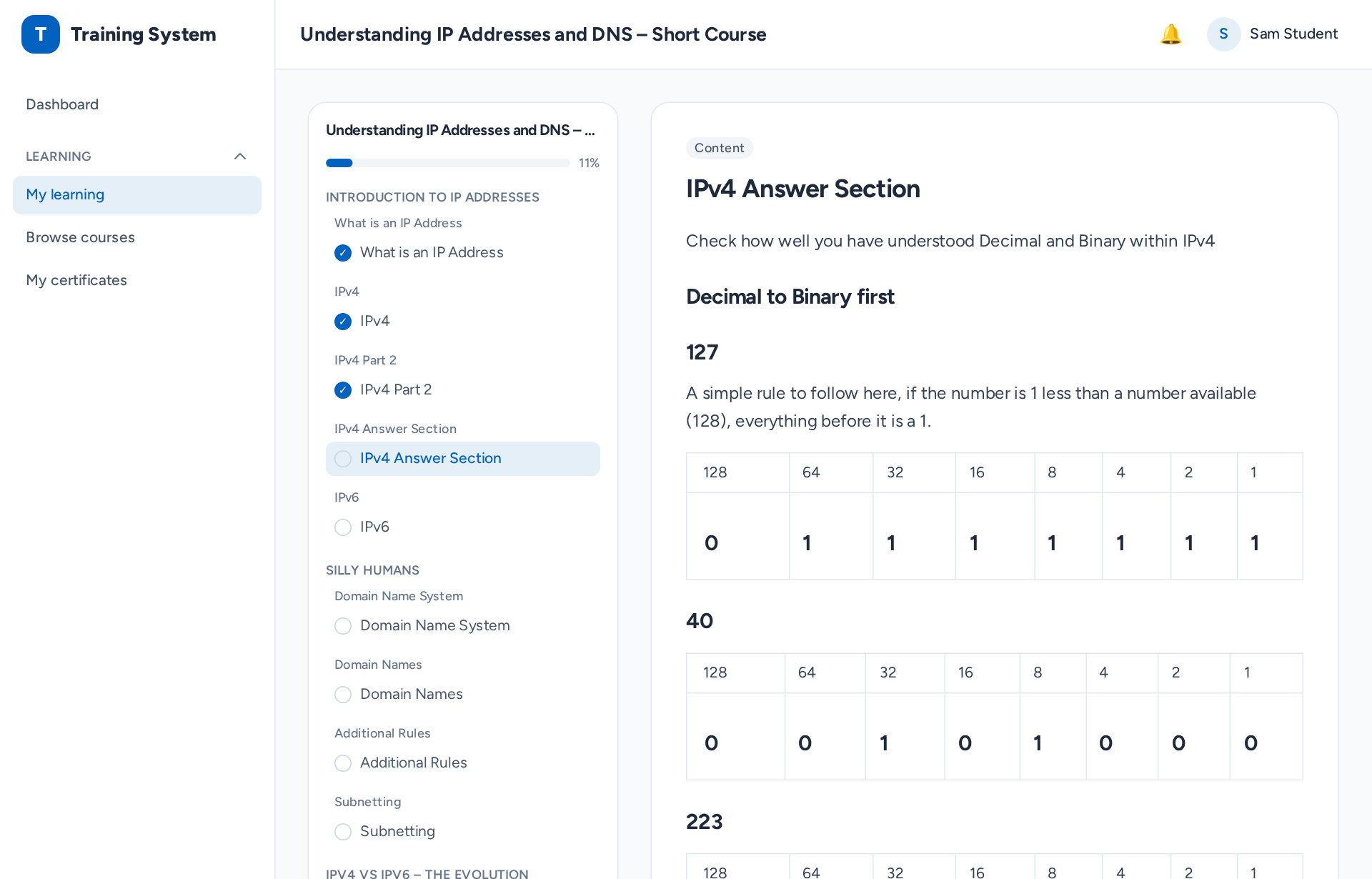
A lesson playing in the on.training course player, with the course outline and progress alongside the lesson content
Who it's for

One platform for anyone who teaches, trains or certifies

Whether you are training your own people or selling what you know, on.training gives you a complete academy without building one from scratch.

Businesses

Train and certify your staff, and turn your expertise into a product.

  • Onboard, train and certify your team
  • Keep training records and compliance in one place
  • Sell your know-how to other companies

Training providers and independent experts

Turn what you know into paid courses under your own name.

  • Publish courses on your own branded site
  • Sell single courses to individuals
  • Sell packages and seat licences to organisations

Schools and tutors

Run classes online with the people who support each learner.

  • Classes and groups with teachers and assistants
  • Parents kept in the loop
  • Assignments and a marking queue for tutors
Features

Everything you need to create, run and sell online training

From the first lesson to the final certificate, every part of your academy is in one place and carries your brand.

Your own branded academy

Learners see your brand from the first page to the last email, not ours.

  • Your own address at yourname.on.training
  • Your logo, colours, fonts and site name
  • Emails sent in your name
  • Your own pages, homepage and blog

A course builder with more than a dozen interactive activity types

Organise courses into modules, lessons and topics, and build each one with a drag-and-drop block editor. Mix reading with activities that make learners think, then check what they have learnt.

  • Quizzes
  • Graded assessments
  • Assignments
  • Multiple choice
  • Short answer
  • Fill in the blanks
  • Drag and drop
  • Drag onto an image
  • Matching
  • Image hotspots
  • Interactive video
  • Flashcards
  • Memory game
  • Word search
  • Put in order
  • Sentence builder
  • Listen and answer
  • Branching scenarios
  • Question banks to reuse questions across quizzes
  • Assignments marked by your tutors
  • A media library for your images, audio and video
  • Copy a whole course in one click

Sell your courses

Take payment for your courses without stitching together separate tools.

  • Sell single courses to individuals
  • Sell packages and seat licences to organisations
  • Card payments through Stripe or Omnipz
  • Automatic invoices, with UK VAT handled
  • Discount codes at checkout
  • Sync with QuickBooks
  • Offer free courses too

Teams, groups and organisations

Train one person or a whole company with the same few clicks.

  • Organisations with their own admins
  • Groups with teachers and assistants
  • Bulk invitations from a CSV file
  • Assign a course to a group and everyone is enrolled
  • Admins can enrol any learner on any course without payment

Certificates and CPD

Reward completion with certificates that anyone can check are genuine.

  • Certificates issued automatically on completion
  • Your own certificate designs
  • A QR code on every certificate, linking to a public verification page
  • A CPD log learners can print

Teaching, marking and reporting

See who is progressing, who needs help and what still needs marking.

  • A marking queue for tutors
  • Learner progress at a glance
  • Assessment results reports
  • Training-records export
  • A full audit log

Community and mentoring

Keep learners talking, supported and connected after they finish.

  • Discussion spaces
  • Mentoring
  • Alumni status after completion
  • Notifications, with email templates you can edit

Found by Google and AI assistants

Help search engines and AI assistants describe your courses correctly, including Google, ChatGPT, Perplexity, Claude and Gemini.

  • A Search & AI panel on every course
  • Structured data built in
  • Glossary pages
  • An llms.txt file for AI assistants

Secure and compliant

Control who can do what, and look after your learners' data properly.

  • Roles and a permissions matrix, with roles you can rename to fit your organisation
  • Two-factor sign-in and passkeys
  • GDPR data export and erasure
  • Each workspace's data kept separate
  • Reading settings for accessibility: font, size, spacing and colours

Live webinars Add-on

Present live slides you build in the course builder, with everyone's screen following yours.

  • Dated sessions people sign up to, free or paid
  • Show and hide items on the slide as you talk
  • Teacher notes only you can see
  • Raised hands and live activity results
  • Pre-tests and post-tests
How webinars work

Private one-to-one sessions Add-on

Short private courses and tests you build once and give to one learner at a time.

  • The same drag-and-drop builder as courses
  • Your own categories, as many levels deep as you like
  • Teacher notes the learner never sees
  • Guided sessions: you turn the pages on the learner's screen
  • Hide and reveal sections live as you go
How Private Sessions work

Resource library

Share worksheets, guides and downloads alongside your courses.

  • PDF, Word, Excel, PowerPoint and audio files
  • Free with an account, included with a course, or sold on their own
  • Files stay private: no shareable download links

Add-ons are included in some packages and can be added to others: each package below shows exactly what it has.

Add-on: Private Sessions

One-to-one teaching, built like a course and taught live

Private Sessions are short courses and tests for private tuition: a one-hour lesson, a revision session, an exam or an assessment. You build each one once, keep it in your own library, and give it to one learner at a time, as often as you like. They are never on sale and never appear in your public catalogue.

How it works

  1. Build the sessionUse the same drag-and-drop builder as your courses, with all the same activities. Sessions are an hour by default, and you can make them longer.
  2. File it in your librarySort sessions into your own categories, as many levels deep as you need (for example Spanish > Locations).
  3. Give it to a learnerChoose a learner and whether you teach it together live or they work through it on their own. Give the same session to the next learner whenever you are ready.
  4. Teach it togetherStart the session and the learner's screen follows yours page by page. Watch their page live as they work, hand control to them when you want them to explore, and take it back at any time.
  5. Leave it for revisionAfterwards, switch the session to self-paced so the learner can go back over it on their own, with sections still hidden or revealed as you left them.

What makes it special

  • Teacher notes throughout. Add notes anywhere on a page. You see them; your learner never does.
  • You turn the pages. In a guided session you control what is on the learner's screen, so you both look at the same thing.
  • See the learner's page, live. Watch exactly what your learner is doing as they do it: their answers, typing, card flips, drag and drop and scrolling.
  • Live activity results. See every answer, and whether it is right, the moment your learner gives it.
  • Hide and reveal as you go. Keep answers, examples or the next task hidden, then reveal them live at the right moment.
  • Built once, used again and again. One session can be taught to many learners over months, and each time you give it is kept as its own separate session.
  • Private by design. Only the learners you give a session to can open it.
Add-on: Webinars

Live webinars for up to 25 participants

Present live from slides you build in the course builder. Every participant's screen follows yours, they take part in activities as you go, and you can add a test before and after. Small groups of up to 25 people keep every session interactive.

How it works

  1. Build the webinarCreate slides in the drag-and-drop builder, add activities, and optionally a pre-test and a post-test. Build it once and run it as often as you like.
  2. Schedule a sessionGive each run a date and time, a number of places (up to 25), a presenter, and make it free or paid.
  3. People sign upParticipants sign up to a session with their account, and take the pre-test beforehand if there is one.
  4. Present liveYour presenter view shows the current slide, the next one and your notes. As you move on, everyone's screen moves with you, and anyone who joins late starts on the current slide.
  5. Follow upThe end-of-session report shows who attended and how they did on each activity. You choose who may take the post-test.

What makes it special

  • Interactive, not just slides. Put activities on a slide and watch everyone's results come in live.
  • Reveal at your pace. Build each slide up item by item on your click, or on a timer, and show or hide items as you talk.
  • Notes only you can see. Your teacher notes sit beside the slide in the presenter view.
  • Raised hands. Participants can raise a hand to ask a question without interrupting.
  • Tested before and after. Measure what people learned with a pre-test and a post-test.
25 participants per session at most Free or paid sessions
Pricing

Simple yearly packages, unlimited learners

Each package lists its limits and every add-on, feature and activity it includes.

Starter

£7.99 a month

£95.88 a year, paid yearly. Excluding VAT.

  • 10 published courses (drafts unlimited)
  • 2 admins
  • 3 teachers
  • Unlimited learners
  • Unlimited markers and assistants
  • Your own branded workspace at yourname.on.training

Add-ons

  • Visual Builder Included
  • Private Sessions £40.00 a year extra
  • Webinars £50.00 a year extra

Features

  • Certificates Included
  • Community Included
  • Mentoring £10.00 a year extra
  • Resource library £10.00 a year extra
  • Microphone for activities Included

Activities

All 15 included:

  • Flashcards
  • Matching
  • Sentence builder
  • Drag & drop
  • Listen & answer
  • Put in order
  • Fill in the blanks
  • Memory game
  • Short answer
  • Image hotspots
  • Drag onto image
  • Interactive video
  • Branching scenario
  • Word search
  • Multiple choice
Apply for Starter

Business

£14.99 a month

£179.88 a year, paid yearly. Excluding VAT.

  • 25 published courses (drafts unlimited)
  • 3 admins
  • 5 teachers
  • Unlimited learners
  • Unlimited markers and assistants
  • Your own branded workspace at yourname.on.training

Add-ons

  • Visual Builder Included
  • Private Sessions £30.00 a year extra
  • Webinars Included

Features

All 5 included:

  • Certificates
  • Community
  • Mentoring
  • Resource library
  • Microphone for activities

Activities

All 15 included:

  • Flashcards
  • Matching
  • Sentence builder
  • Drag & drop
  • Listen & answer
  • Put in order
  • Fill in the blanks
  • Memory game
  • Short answer
  • Image hotspots
  • Drag onto image
  • Interactive video
  • Branching scenario
  • Word search
  • Multiple choice
Apply for Business

Professional

£32.99 a month

£395.88 a year, paid yearly. Excluding VAT.

  • 100 published courses (drafts unlimited)
  • 10 admins
  • 20 teachers
  • Unlimited learners
  • Unlimited markers and assistants
  • Your own branded workspace at yourname.on.training

Add-ons

  • Visual Builder Included
  • Private Sessions Included
  • Webinars Included

Features

All 5 included:

  • Certificates
  • Community
  • Mentoring
  • Resource library
  • Microphone for activities

Activities

All 15 included:

  • Flashcards
  • Matching
  • Sentence builder
  • Drag & drop
  • Listen & answer
  • Put in order
  • Fill in the blanks
  • Memory game
  • Short answer
  • Image hotspots
  • Drag onto image
  • Interactive video
  • Branching scenario
  • Word search
  • Multiple choice
Apply for Professional

Need a little more room?

Add an extra course or teacher slot at any time for £35.88 a year each (£2.99 a month), without changing package. Slots added part-way through your year are charged only for the time left.

Upgrade whenever you like

Move up a package at any time and pay only the difference for the rest of your year. Your renewal date stays the same, and your courses, learners, results and certificates all carry over.

Self-hosted

Prefer to run it yourself?

Your own copy of the whole platform, on your hosting or ours. One academy, no limits, and you keep full control of your data.

£350.00 a year

Paid yearly. Excluding VAT. Hosted by us: £90.00 a year extra.

  • Unlimited courses, admins, teachers and learners
  • Every feature and all 15 activities, in your own single academy
  • Install on your own hosting (shared hosting, VPS or server), or let us host it
  • Download, web installer and step-by-step guide in your licence area
  • Updates for as long as your licence is renewed
  • Keeps working if you do not renew: your courses and records stay yours
  • Visual Builder included
  • Private Sessions: £20.00 a year extra
  • Webinars: £30.00 a year extra

All prices exclude VAT. Packages are paid yearly in advance. Online payment opens soon: apply now and we will set your workspace up.

See it in action

Real screens from on.training

These are screenshots of the working product, taken from our live demo academy.
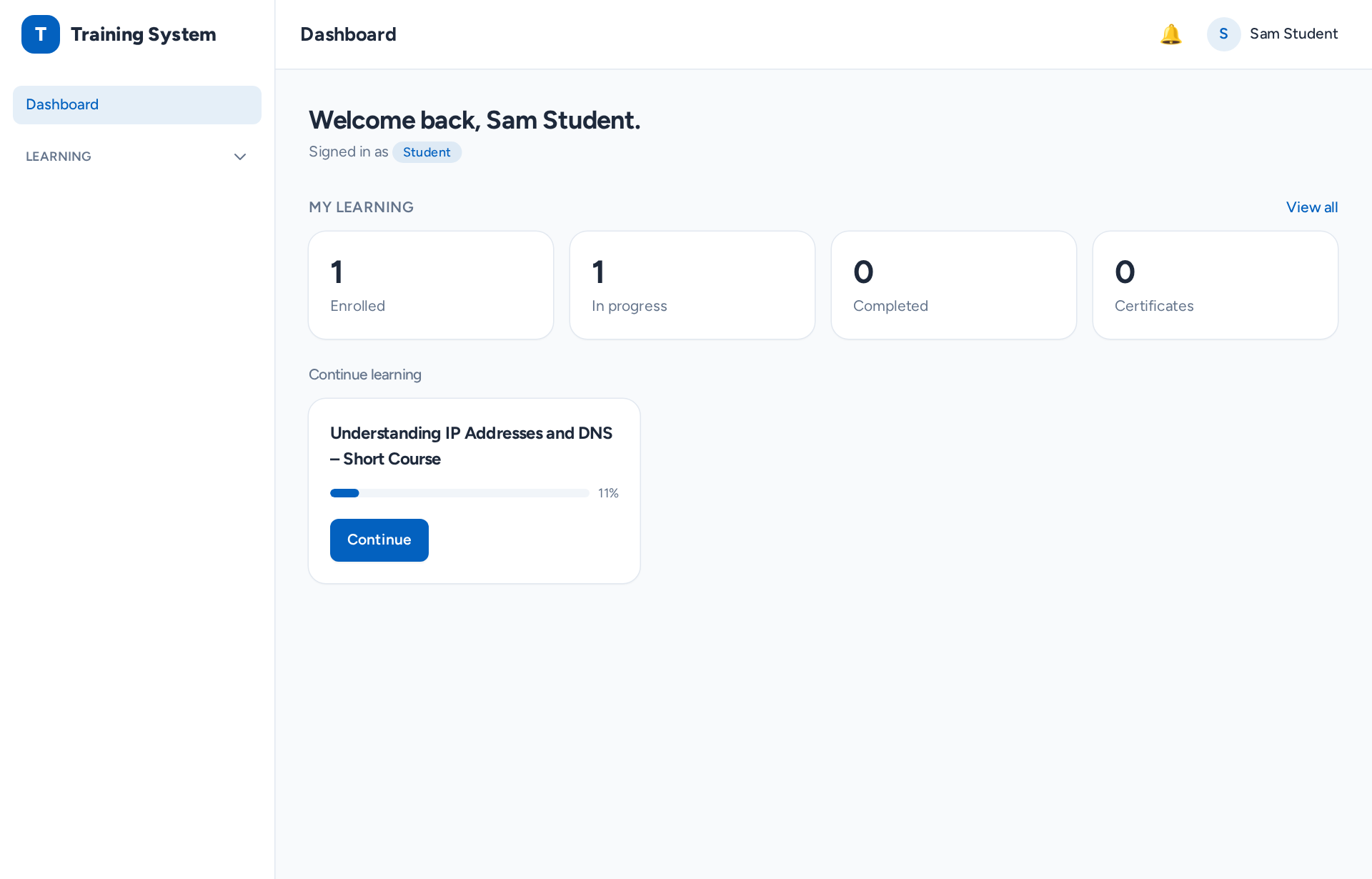
A learner's dashboard showing their enrolled courses and progress
Learner dashboardEach learner sees their courses, progress and next steps.
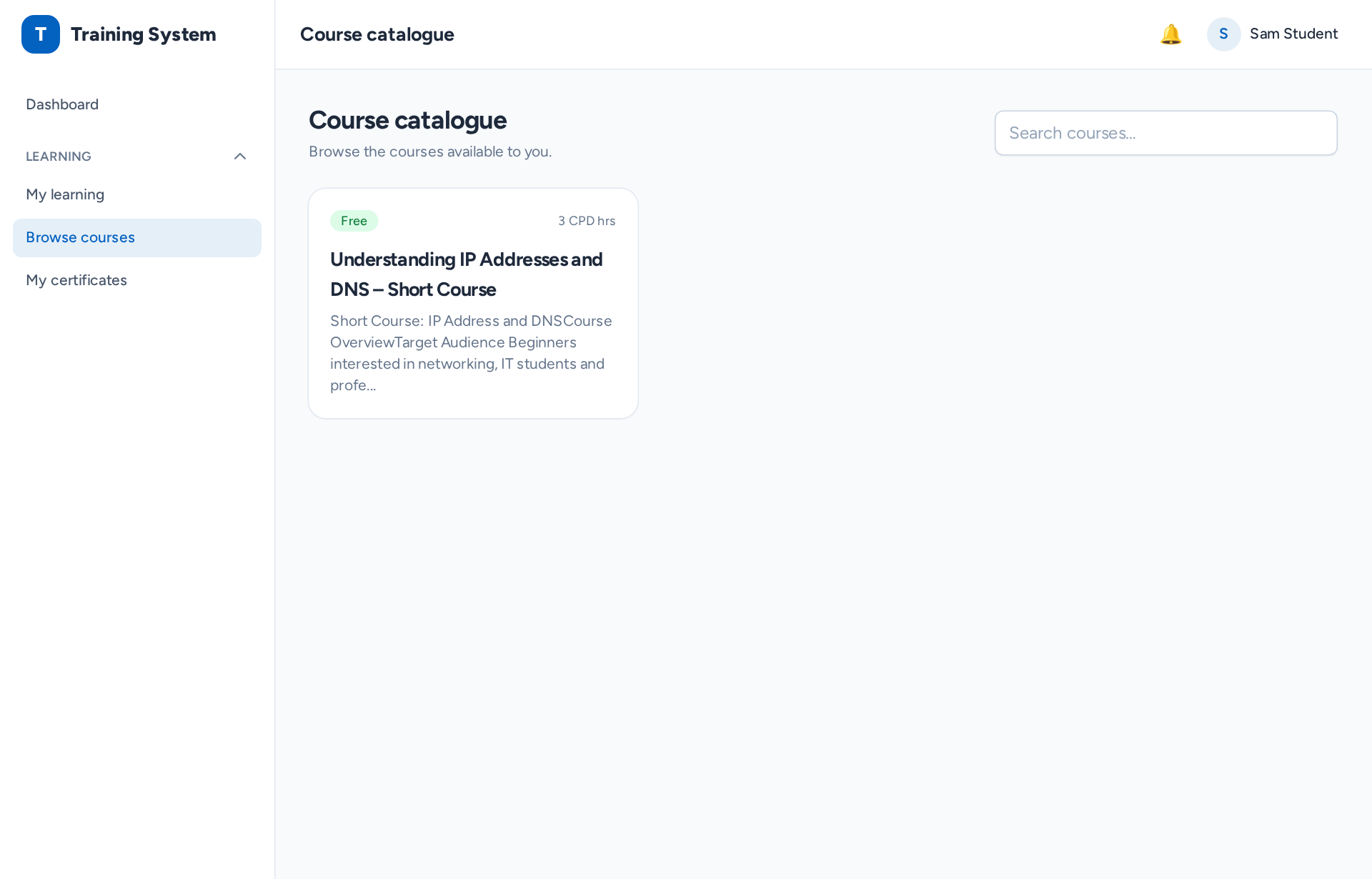
A course catalogue listing courses available to browse and buy
Course catalogueYour courses, ready to browse, enrol on and buy.
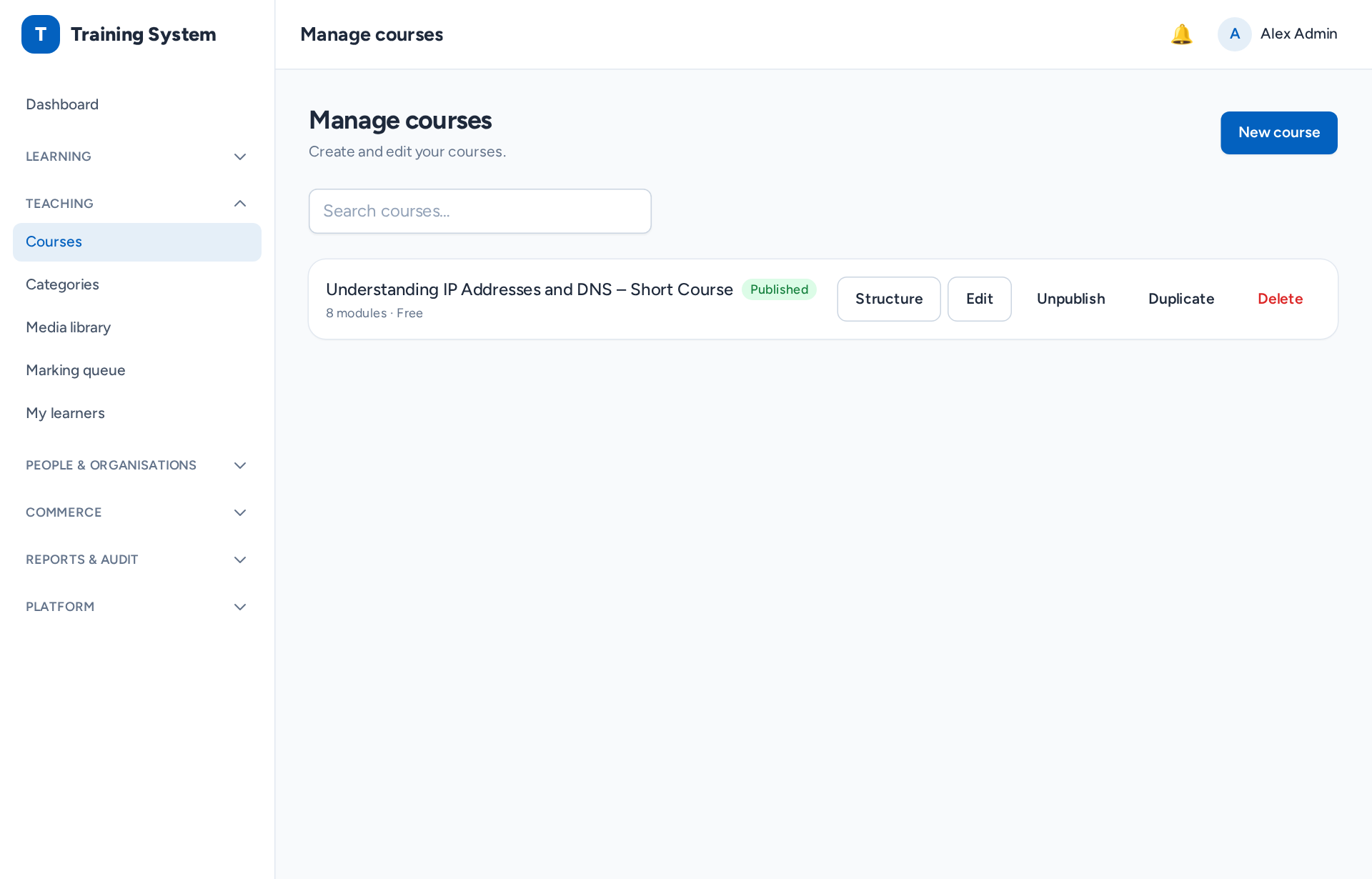
The course management screen used to build and organise courses
Course authoringBuild and organise modules, lessons and topics.
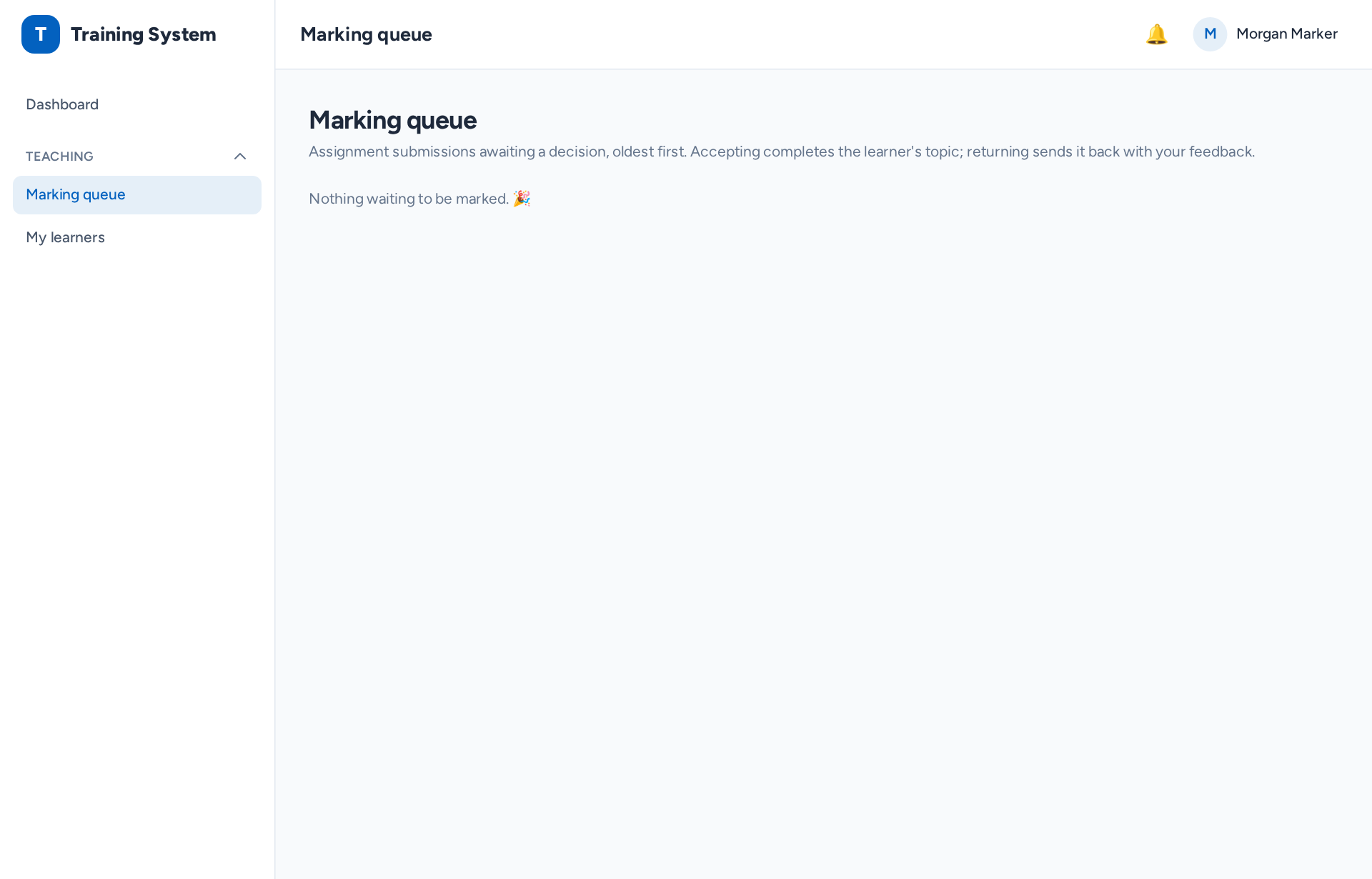
A teacher's marking queue listing submitted assignments waiting to be marked
Marking queueTutors see every submission waiting for their feedback.
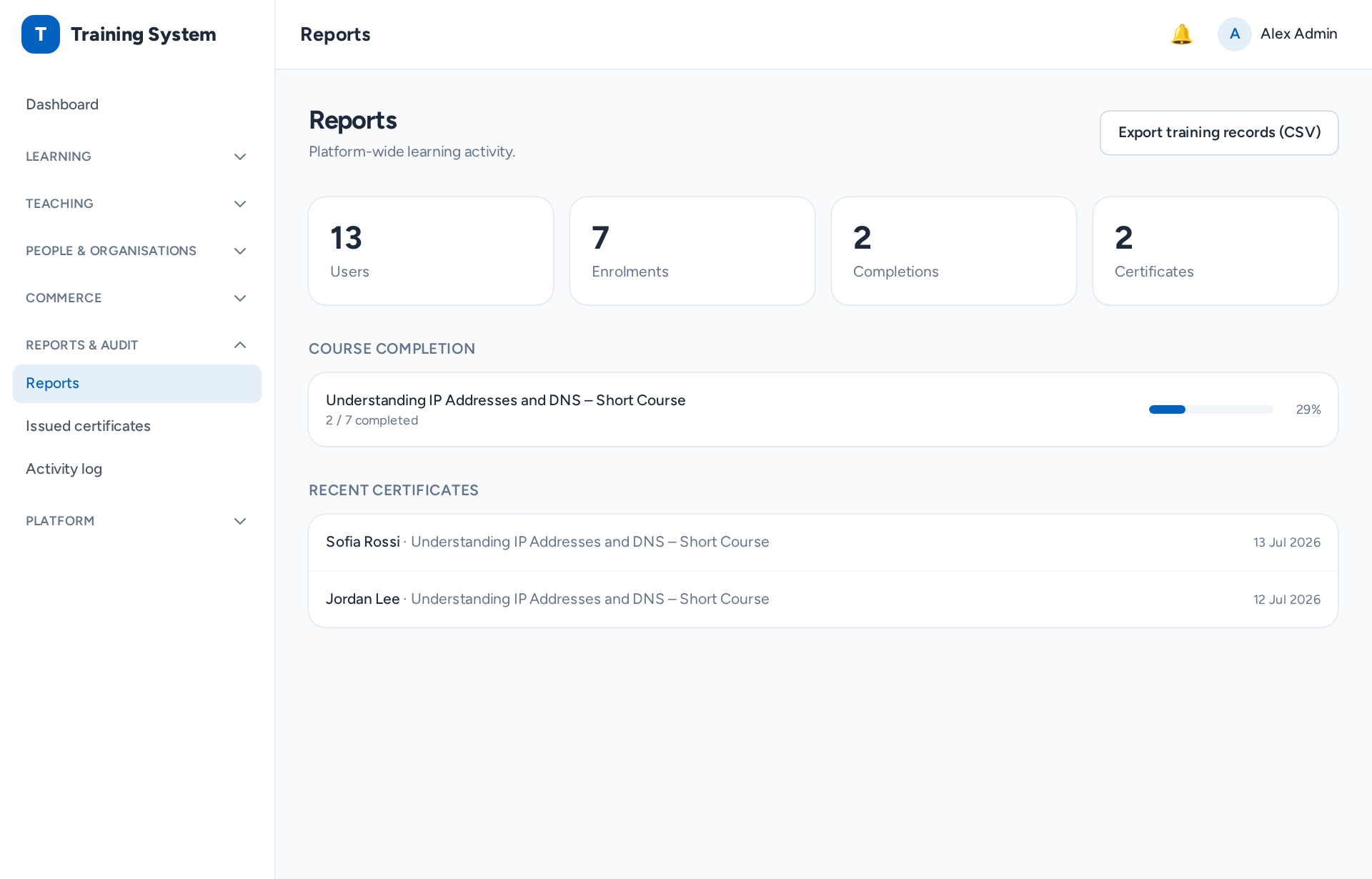
Admin reports showing learner activity and results
ReportsProgress, results and training records for admins.
The course player with a lesson open and the course outline beside it
Course playerLessons and activities in a clear, focused layout.
Want to click around yourself? No sign-up, sample data, resets regularly. Try the live demo
How it works

From application to your first sale in three steps

  1. Apply for your workspace

    Tell us about your organisation and what you plan to teach.

  2. We review and approve it

    Our team checks every application by hand. Once approved, your 30-day free trial starts.

  3. Brand it, build it, start selling

    Add your brand, build or bring your courses, invite your learners and start selling.

Ready to launch your academy?

Apply for your own workspace today, or explore the live demo first.

Already have a workspace? Find your workspace